How we prove your files are never uploaded
Every NoUploadPDF tool works on your file inside your own browser, on your phone or computer, and never uploads it. You don't have to take our word for it: here are two checks you can do yourself in a minute, what our own test sees, what our pages are allowed to contact, and what we can't prove.
- No tool has an upload step
- Most tools keep working offline
- Every site our pages may contact, listed
Check 1: watch the network panel
Your browser can list every request a page makes: each file it downloads and everything it sends. This list is the network panel, part of the browser's developer tools, and it is easiest to use on a computer, in Chrome or Edge:
- Open a tool, for example the PDF compressor, and wait until it says Ready.
- Press F12 (on a Mac, Cmd + Option + I) and choose the Network tab.
- Press the clear button, a circle with a line through it, so the list starts empty.
- Add your PDF and let the tool finish.
- Look at the list. Type
method:POSTin the filter box to see only requests that send a body, the way a file would be sent.
None of the requests carries your file. Some tools download a part they need the first time a file needs it, such as a font for Word to PDF: those come from this site and carry nothing of yours. Google's ad code, which pays for the site, makes requests of its own to Google's ad service, with addresses such as googlesyndication.com and doubleclick.net, as on any site with Google ads. Our code never gives your files to the ad code. To see what a request sent, click it and open its Payload tab.
Check 2: turn off the internet
- Open a tool and wait until it says Ready.
- Turn off Wi-Fi and mobile data, or switch on airplane mode.
- Add a file and let the tool work. It still finishes and saves the result, because the work happens on your device.
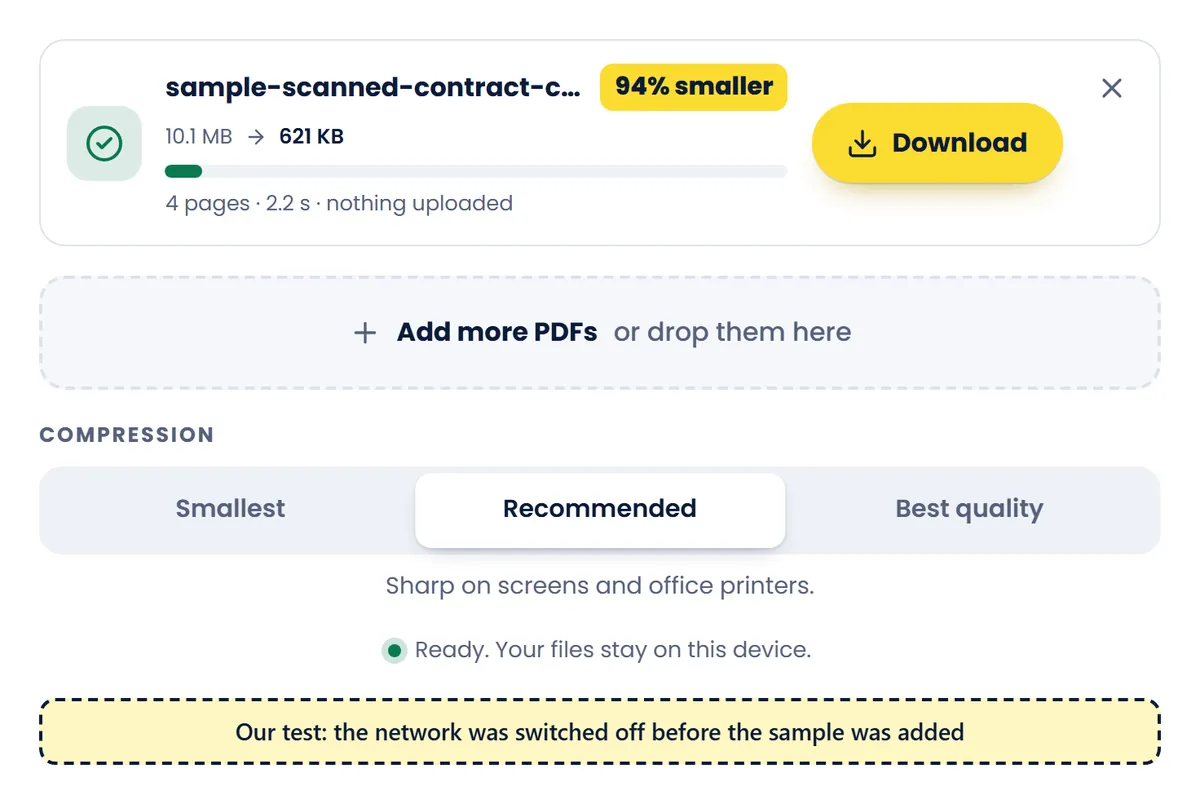
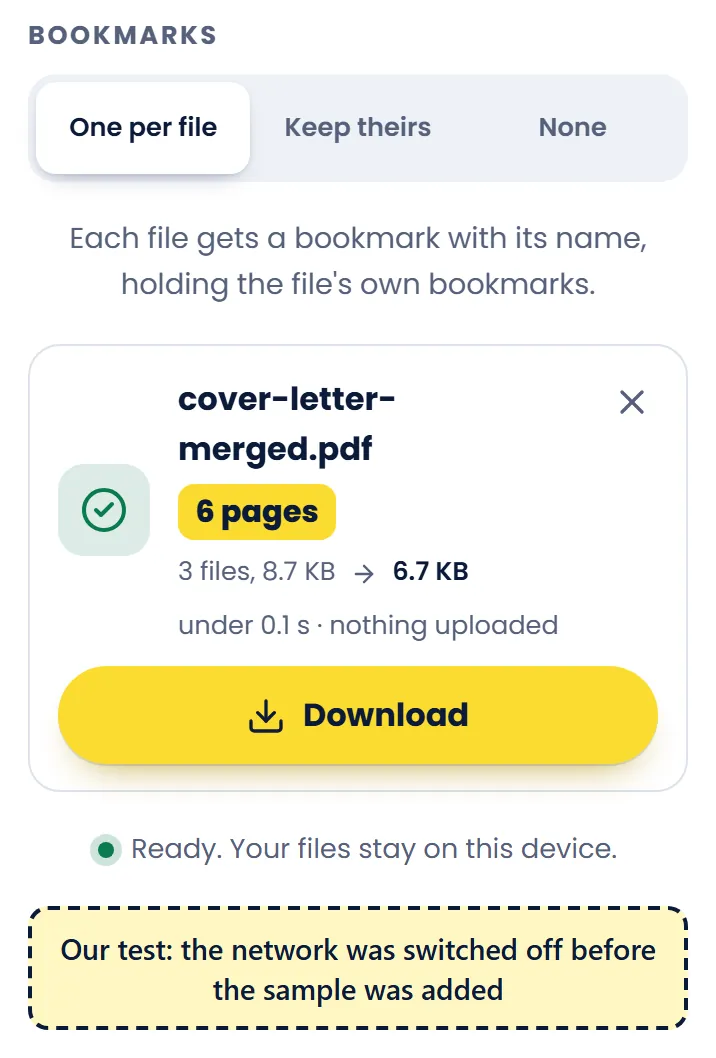
In our test on 9 October 2026, every tool but one finished its built-in sample with the test browser's network switched off. The one is Word to PDF: it downloads its converter and fonts from this site the first time a document needs them, so it needs the internet for that. PDF to JPG, PDF to PNG, PDF to Word, the PDF Viewer and Compare PDF read pages with pdf.js, which downloads a font or a decoder from this site the first time some PDFs need one, so a few PDFs need the internet once. The page tools draw their page previews the same way; saving the file doesn't need it. Try it with a file of your own: the compressor's sample is itself a part the page downloads when you press its button.
What our own test sees
We run both checks automatically, with Playwright, a program that drives a browser and records every request it makes. For each tool, our test opens the page, waits until it is ready, loads the sample's own script if the page fetches it only when asked, switches the network off, runs the tool on its built-in sample and lists every request the page and its background workers made. It fails if any request sent data, or if the tool needed the network while it worked.
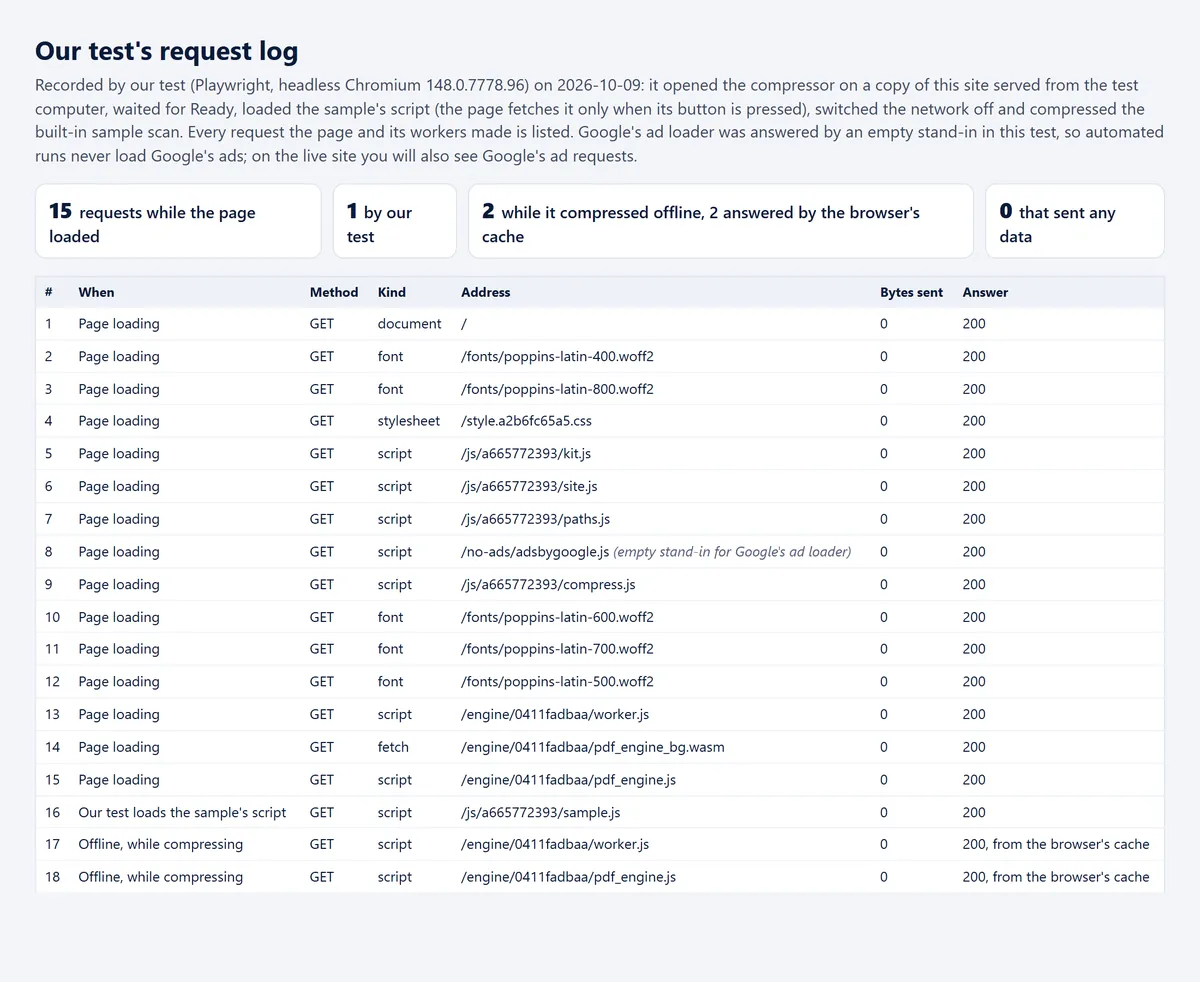
In these runs Google's ad loader is answered by an empty stand-in, so our automated visits never load Google's ads. A separate test loads Google's real ad code, with a stand-in publisher ID so no ad views are counted, and fails if any request made while a tool works on a file carries 4 KB or more.
What our pages are allowed to contact
Every page carries a Content Security Policy: a list, sent with the page, of the places it may load things from and send data to. Your browser enforces it and blocks everything else. Ours lets the pages contact this site and Google's ad and font services:
| What | Allowed |
|---|---|
Anything not named below default-src | This site |
Programs (scripts) the page may run script-src | This site, WebAssembly (our engines), the one line that starts an ad, https://*.googlesyndication.com, https://*.doubleclick.net, https://*.adtrafficquality.google, https://*.google.com, https://*.gstatic.com |
Styles style-src | This site, styles written into the page, https://fonts.googleapis.com |
Pictures img-src | This site, pictures written into the page, files the page makes itself, in memory, https://*.googlesyndication.com, https://*.doubleclick.net, https://*.adtrafficquality.google, https://*.google.com, https://*.gstatic.com |
Fonts font-src | This site, https://fonts.gstatic.com |
Where the page's scripts may send or fetch data connect-src | This site, https://*.googlesyndication.com, https://*.doubleclick.net, https://*.adtrafficquality.google, https://fundingchoicesmessages.google.com, https://csi.gstatic.com |
Frames inside the page (ads show in frames) frame-src | This site, https://*.googlesyndication.com, https://*.doubleclick.net, https://*.adtrafficquality.google, https://*.google.com, https://*.gstatic.com |
Background workers (where the tools do their work) worker-src | This site, files the page makes itself, in memory |
Plug-ins object-src | Nothing |
The page's base address base-uri | This site |
Where a form may send what is typed in it form-action | Nothing |
Other sites that may show this page inside theirs frame-ancestors | Nothing |
This is the policy as the site sends it. The copy inside each page leaves out the last rule, which only works when it comes with the page: default-src 'self'; script-src 'self' 'wasm-unsafe-eval' 'sha256-L9NtTqBLxf1z3sIza7z/JTtm01m91a8xVl07p4WTMYw=' https://*.googlesyndication.com https://*.doubleclick.net https://*.adtrafficquality.google https://*.google.com https://*.gstatic.com; style-src 'self' 'unsafe-inline' https://fonts.googleapis.com; img-src 'self' data: blob: https://*.googlesyndication.com https://*.doubleclick.net https://*.adtrafficquality.google https://*.google.com https://*.gstatic.com; font-src 'self' https://fonts.gstatic.com; connect-src 'self' https://*.googlesyndication.com https://*.doubleclick.net https://*.adtrafficquality.google https://fundingchoicesmessages.google.com https://csi.gstatic.com; frame-src 'self' https://*.googlesyndication.com https://*.doubleclick.net https://*.adtrafficquality.google https://*.google.com https://*.gstatic.com; worker-src 'self' blob:; object-src 'none'; base-uri 'self'; form-action 'none'; frame-ancestors 'none'
The privacy policy page loads no ad code at all.
What our code does with your file
- When you choose a file, your browser hands it to the page, which reads it into your device's memory.
- The tool works on it there, inside the page or in a background worker of your browser: with our engines, written in Rust and run as WebAssembly, with pdf.js, the PDF reader built into Firefox, or with our own JavaScript.
- The result is made in memory too, and your browser saves it like any download.
- No tool has an upload step, and our code never gives your files to the ad code.
What we can't prove
- We test in Chromium, the open-source browser Chrome and Edge are built on, at computer and phone screen sizes. We have not tested Safari, Firefox or real phones ourselves; you can run the same two checks in them.
- Google's ad code runs on our pages, but not on the privacy policy or the error page. It is Google's code, not ours: it sends Google the page address and details about your browser, as our privacy policy explains. Our code never gives it your files.
- Browser extensions you have installed can see the pages you open, here as on any site.
- A check shows what happened in your browser when you ran it. If a tool ever changed how it works, the same checks would show it.
Questions
If a check shows something you don't expect, please tell us on our contact page.
Compress a PDF